
Your AI usage limits,
always in sight.
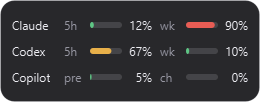
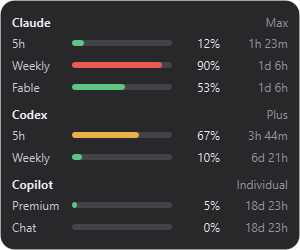
QuotaBubble is a tiny, always-on-top desktop bubble that shows the usage limits for your AI coding tools without opening a dashboard, terminal, or browser. It fades away when idle and expands when you click it.
Direct downloads: WindowsmacOS (Apple Silicon)macOS (Intel)Ubuntu GNOME All releases
Features
-
Frameless bubble
Translucent, rounded, always on top, and it never steals keyboard focus.
-
Fades when idle
A configurable low opacity keeps it out of the way, and hovering brings it back.
-
Click to expand
Every usage window, the percentage used, and a live reset countdown.
-
Drag anywhere
Move it across monitors, and its position is remembered.
-
Stays accurate
Refreshes every 5 minutes and keeps the last good values through transient errors.
-
Local only
Reuses the credentials your tools already store. No telemetry, no server.
Works with your tools
QuotaBubble reads the sign-in each tool already stores, so there is no QuotaBubble account and nothing extra to log into.
- macOS Keychain (Claude Code-credentials) or ~/.claude/.credentials.json
- ~/.codex/auth.json
- Cursor IDE state.vscdb or auth.json
- API key
- Windows Credential Manager, macOS Keychain, or Linux Secret Service
- Windows Credential Manager, macOS Keychain, or Linux Secret Service
- ~/.grok/auth.json from grok login
- Kimi Code CLI login in ~/.kimi-code
- ~/.local/share/opencode/auth.json or an API key
- API key
- API key
- Windows Credential Manager (sign in to Zed)
Hover, focus, or tap a tool to see where it reads from.
Tool icons on the website come from @lobehub/icons (MIT). All product names and logos belong to their respective owners and indicate compatibility only.
Install
Windows
Install from the Microsoft Store for a certified build with automatic background updates:

Or install with
winget, built into Windows 10/11 and updated automatically with
winget upgrade:
winget install Izzet.QuotaBubbleOr install with Chocolatey:
choco install quotabubbleOr with Scoop:
scoop bucket add izzet https://github.com/izzet/scoop-bucket
scoop install izzet/quotabubble
Or download the portable QuotaBubble-windows-x64.zip from
Releases, unzip it, and run QuotaBubble.exe.
The Microsoft Store package is certified with zero warnings. The standalone portable zip is unsigned for now, so Windows SmartScreen may ask you to choose “More info → Run anyway”.
macOS
With Homebrew, using the first-party tap (works on both Apple Silicon and Intel):
brew install --cask izzet/tap/quotabubble
Or download the matching disk image from Releases:
QuotaBubble-macos-arm64.dmg for Apple Silicon, or
QuotaBubble-macos-x64.dmg for Intel. Open it and drag QuotaBubble to Applications.
The macOS builds are not yet Developer ID signed or notarized, so Control-click the app, choose Open, and confirm the dialog on first launch.
Ubuntu GNOME
Download QuotaBubble-linux-amd64.deb from Releases, then
install it and enable the GNOME extension:
sudo apt install ./QuotaBubble-linux-amd64.deb
gnome-extensions enable quotabubble@izzet.dev
Open quotabubble-settings to choose providers, notifications, and launch at login.
FAQ
Does QuotaBubble send my data anywhere?
No. There is no QuotaBubble account, server, or telemetry. It only talks to the service each login belongs to, over HTTPS, to read your own usage numbers. The details are in the privacy policy. Read the privacy policy.
Why does it read my sign-in files?
To ask each service for your usage, it reuses the sign-in your tool already stored: a file in your home folder or an entry in the OS keychain or credential store. It never modifies or copies those files, only reads the tools you have enabled, and the whole app is open source so you can check.
Why does Windows or macOS warn me when I open it?
The standalone ZIP and DMG builds are not code-signed yet. On Windows choose “More info → Run anyway” in SmartScreen, and on macOS Control-click the app, choose Open, and confirm. If you install from the Microsoft Store on Windows, it is certified and signed with zero warnings.
My provider isn't showing up. What do I do?
Sign in to that tool first (Claude Code, Codex, Cursor, and so on), then open Settings and enable it. Providers that use an API key, like DeepSeek, OpenRouter, and Z.ai, need the key entered in Settings, and the Test button checks it. If it still fails, Open logs from the tray menu shows what went wrong, with secrets redacted.
How often does it update, and what if I'm offline?
Every 5 minutes by default, configurable in Settings. If a refresh fails because of a network or rate-limit error, it keeps showing the last good values, dimmed, and tries again on the next refresh.
Which systems does it run on?
Windows and macOS (Apple Silicon and Intel), plus Ubuntu GNOME through a package with a GNOME extension. You can also run it from source with Python 3.11 or newer, though other setups aren't tested.